Real-time manufacturing line visualisation
Navigate a 3D representation of the factory and view the status of lines, machines and workstations with information tailored to each role.
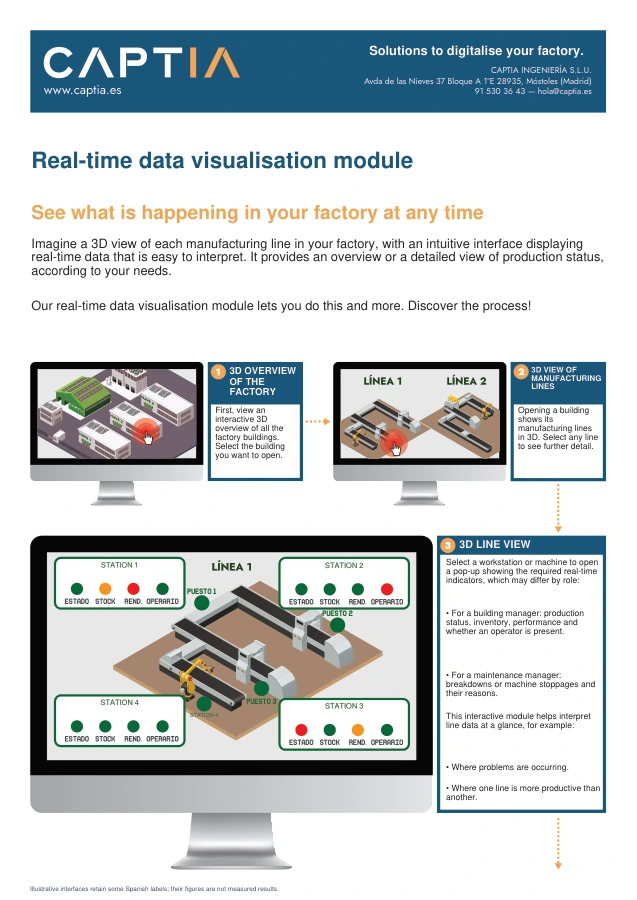
From factory to workstation
Navigation starts with an overview of factory buildings. Each building leads to its lines, and each line to machines and workstations. Detail links data to the manufacturing point where it originates.
Indicators by role
A production manager can view progress, stock or operator presence. Maintenance can focus on breakdowns, stoppages and reasons. Information and update frequency are defined by available sources and scope.
Production statistics
Panels let users explore error causes, shifts and production trends. Screen figures in the document are illustrative and do not represent improvements achieved by a client.
Explore this application in depth.
Real-time manufacturing line visualisation
What you will find in the document
- From building to workstationAn example of 3D navigation through buildings, lines, machines and workstations.
- Information for each roleProduction and maintenance views with data linked to the manufacturing point.
- Example indicatorsScreens showing activity, stoppages and production statistics.
Screens and data are illustrative.